I Dose has a collection of free sounds that, they say, can help relax your stressed brain or make it more alert and improve the concentration level.
These are basically Binaural Beats and used by neurophysiologists to lower the brain frequency to relax the listener or to raise it to help focusing.
I haven’t tried them but there’re a few interesting tones. For instance, i you are addicted to caffeine, try the Coffee Break tone as a replacement for drinking coffee. Then there’s an Inspiration tone for creative artists and writers.
Showing posts with label Web. Show all posts
Showing posts with label Web. Show all posts
Saturday, July 12, 2008

Thursday, June 19, 2008
Google Search Inspired by Unix Command Shell

Goosh is brilliant. You can execute Google search commands in the browser just like using the Unix shell and the results get displayed inline. You can even search for feeds with Google just like MSN.
Monday, May 26, 2008
Download Multiple Web Videos Into a Single Movie or MP3
While there are tons of tools that let you download web videos with ease, MovAVI offers one unique feature - it can join multiple videos from YouTube, Metacafe, Break.com, etc. into one single file all by itself that you can later download in any format.
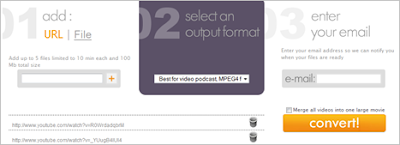
Using Movavi is simple - just add the different video URLs (5 is the limit) and select an output format. You can either request the combined video clip as an MP3 audio file (great for music videos) or in regular formats like iPod MP4, AVI, Flash Video & Quicktime.
Movavi will not join your videos instantly - it sends out an email when the video to ready for download. If you are looking for instant conversion, check this Flash Video Guide. MovAVI can also be used to join video files that reside on your local hard drive.
Tuesday, April 22, 2008
Type Web Addresses Quickly -The Best Keyboard Shortcut in Firefox
If you haven’t upgrade to Firefox 3 yet, please do so. The new version is far more responsive and stable that its predecessors.
Another reason for loving Firefox 3 is the way it auto-completes web URLs - very intelligent and something you’ll miss in IE. Update: Firefox 2 users share that this works in the previous version as well.

To get started, press Alt+D or Ctrl+L to move the cursor to your Firefox browser address bar and then try some of these combinations:
To open Google Maps website, type "google/maps" in the Firefox address bar (no quotes) and press Ctrl+Enter. And for your Google AdSense page, type "google/adsense" followed by Ctrl+Enter.
Firefox will automatically surround the word(s) that are before the first slash with www. and .com. IE 7 and previous version of Firefox can’t do this.
And this URL auto-complete works even if you have several subdirectories in the URL. For instance, your Google Apps sign-in page will open correctly if you type "google/a/mysite.com" and press Ctrl+Enter.
If you want to open a .org site, you need to use Ctrl+Shift+Enter. Typing labnol/forums followed by Ctrl+Shift+Enter would therefore open our support website at www.labnol.org/forums.
And for .net websites, the shortcut key is Shift+Enter. So you can view the most popular PowerPoint presentations on Slideshare by typing slideshare/popular followed by Shift+Enter.
Yahoo! Integrates Images from Facebook Profiles in Search Results

Yahoo! is now displaying pictures from Facebook profiles next to search results just the way Google shows image thumbnails in search pages.
To see if your Facebook picture shows up in Yahoo, either search for your own name in quotes and scan through the search page or, a better option, try the following query on Yahoo!
site:facebook.com "Your Name" - check this live example for Michael Parekh.
The thumbnail images are served directly from Facebook servers and not cached by Yahoo! - that’s good thinking because if you update your profile picture on Facebook, it will immediately show up in Yahoo! search pages.
Sunday, March 16, 2008
The return of dotcommers

Circa 2001, these were not exceptions but the rule. Websites were collapsing like a heap with similar storylines: frenzied hiring, high overheads, no business plans and no clear revenue streams. The bloodbath sucked out money (read: venture capital) from India's fledgling Net economy and with it, some people faded away too.
Some, but not all. Much of the entrepreneurial fade-out turned out to be transitory and many returned to their start-up ways after a lull, but kept a low profile. Some changed their tack, re-inventing their tech story and moving on to the next best trend. A few went on investing undeterred and went from strength to strength. Only a few hung up their entrepreneurial boots, selling their babies for a price.
Here's catching up the posterboys of dotcom era, boys who were mattered most during the sunshine days of dotcoms.
Tuesday, March 11, 2008
Meet the Web Giants That You didn't Even Know

Google, Yahoo and MSN may be the global Internet leaders. However, these leaders face tough competition from local favourites in several countries.
Baidu is known as a Google trouncer in China, Yahoo has just been dethroned by Wretch in Taiwan. The social networking site SkyRock leads in Belgium. Similarly there are several other local and several small international players which have emerged as top online destinations in several countries giving global Internet poster boys a run for their money.
Meet the Web giants you didn't know about.
Tuesday, February 26, 2008
Without an Internet Connection, Read Your Favaorite Websites

Do you spend a lot of time away from the computer in places where there’s no internet connectivity or if does exist, the cost of accessing the web are way too high.
Have you ever wished reading some of your favorite blogs and websites even while still staying offline? Well now you can, courtesy Webaroo.
Just like the Apple iPod lets you listen to your favorite songs while you are away from the computer, Webaroo is a free software that lets you browse (and search) web content on your laptop while you are disconnected.
You may have often read about offline browsing software utilities like wget that help you mirror complete websites and image galleries to the local hard drive of your computer. Webaroo is something more.
Once you install Webaroo software, you suggest a list of blogs, websites, videos, podcasts or any other online content that you would like to read offline.
When you connect your laptop to the Internet, Webaroo fetches the web pages from the internet and creates a local copy which is no different than the original web version. Depending on your setting, Webaroo will also download content other than text which may include images, songs, videos, Office documents or anything else found on your favorite websites.
If you are too lazy to make suggestions, just import your browser bookmarks in Webaroo . Alternatively, you can download readymade web packs from the Webaroo site which are like a collection of popular websites arranged in categories. For instance, the technology news web pack may include sites such as CNET, PC World, PC Magazine, etc.
Other than browsing the content offline, you can use the Webaroo desktop search engine to find information that already saved on the computer.
And the next time you connect to the internet, the software will automatically update the local cache copies if the source website have been modified. Can’t get simple enough.
Monday, February 25, 2008
Save All Websites U visited when it comes to Call the Day Off
Imagine a situation where are you have a dozen different websites open inside Firefox and suddenly your wife walks in saying - "Let’s go out for dinner and then see a movie."
That’s an offer you can’t refuse but before shutting down the computer, you would like to save a list of all websites that are currently open in Firefox. Here are some suggestion on how to achieve this?
Option 1. Press Ctrl+Shift+D or go to Bookmarks and select "Bookmark all Tabs". This will save all the open tabs into one folder and you can resume surfing the next day by select "Open All in Tabs" from the bookmark folder.
Bonus Tip: Name this folder something like "Feb25" or "022508" so it becomes easy for you to guess the date from the folder name itself.

Option 2. Send Tab URLs - This extension helps you send URLs of all open tabs to any other email address tabs using your default email program - it could be Gmail, Microsoft Outlook or anything else. Very handy if you are working from home and need to access the same websites from office the next day.
If you don’t want email, use Tab URL Copier to copy URLs of all open tabs to the clipboard and paste them inside any note taking software like Google Notebook.


Option 3. Google Browser Sync - If you have a Google Account and work across computers, this Firefox add-in from Google is a perfect way to save your Firefox tabs and open windows. Unfortunately, Google Browser Sync is not supported on Firefox 3.
Option 4. Session Manager - This is probably the most popular solution for save your browser session in Firefox. It will even restore your windows and tabs incase your browser crashes.
Firefox, even without any extensions, will prompt your save the tabs if you decide to quit the browser when multiple tabs are open. This sounds like a good idea but if you are sharing the computer with other family members, you run the risk of losing work if someone else logs in the next day before you do.
Thursday, February 21, 2008
Embed Images from Google Maps In Emails & Blogs Without Using Screen Capture Software

It is now possible to embed live images of Google Maps in emails and other websites (like MySpace, Facebook or WordPress.com) that do not allow JavaScript.
Earlier you had to take a screenshot of the Google Maps and save that as an image file but that’s no longer necessary as this Static Maps Wizard will let you create a still but dynamic image of any location on Google Maps.
For instance, the map of Hyderabad above is not a screenshot but a live image served from Google Maps using this URL.
You can place the Google Maps image in any web page using the standard
Wanna Have Fun - Add Humorous Captions and Graphics to Any Photo on Any Website

Photo Crank is as online service that lets you add captions and entertaining graphics to web photos on the fly - you could use this either for fun (like running a caption contest) or for collecting feedback on certain photos.
And there are no licensing issues because the photo stays on the original website.
You can add a line of code to your blog template and readers can then add captions to your photos and images while staying inside the blog. These comments are automatically saved with the photo and others can also read them.
To see all this in action, visit the blog of fake Steve Jobs and wait for this photo to load in the browser. This will particular interest blogs that are about celebrities.
Wednesday, February 20, 2008
Scribd iPaper - Embed Documents in Web Pages, Also Make Money via Google AdSense

pdf scribd ipaperScribd, a perfect place for uploading Office documents and PDFs, has moved from Adobe Flash Paper to a new iPaper format that is definitely more impressive and also allows web publishers to monetize documents.
With the new iPaper format, you can embed virtually any document format into your website or blog as a flipping book with 3D page turning capabilities or in a landscape (presentation) mode.
This is very similar to the Issuu PDF Converter but the advantage is that you can print and search through documents inside the iPaper viewer - something which is not possible inside Issuu.
Scribd provides a simple QuickSwitch mode - you copy-paste a block of code in your blog and all documents/PDFs (that are mentioned in your articles) will be auto-converted into iPaper format without you having to upload files manually. This mode will also replace the document links in your web pages with an embedded document player. Simple!
Another attraction is AdSense - Scribd will pay blog owners who embed documents in their blogs using iPaper - the earnings will be based on the number of ad impressions served via Google AdSense. And if you are a content publisher, Scribd offers something similar to Ads for PDF where you also get to monetize your own documents.
Arrange Browser Bookmarks Like The Icons On Your Desktop

Deskload is a visual way of organizing links to your favorite websites just the way you arrange icons across the Windows desktop.
You can manually add your favorite websites to the Deskload desktop or import addresses in bulk via the Browser bookmarks file.
Once you have created a desktop of bookmarks, you can arrange and move these web page icons around, change the background wallpaper and then save the layout so that the desktop is accessible from any computer.
Handy if you maintain a small list of websites that you need to access from other computers.
Wednesday, February 13, 2008
Want to know the Great Web sites......Dont Install StumbleUpon Toolbar ....there is a Trick


Auto Discover Great Websites Without Installing StumbleUpon Toolbar; Works In All Web Browsers
stumbleupon toolbar not for safari, opera StumbleUpon is a wonderful way to randomly explore some of the best web content, photos and videos on the Internet. It shows websites that you are very likely to enjoy as they are recommend by like minded people..
To use StumbleUpon, you need to install a toolbar that is available only for Internet Explorer and Firefox. There’s no official support for Opera and Apple Safari.
There is however a quick workaround so you can continue to find great websites with StumbleUpon without downloading the toolbar - the trick works on non-supported browsers as well. (see screenshots).
Apple Safari with StumbleUpon Toolbar
stumbleupon safari toolbar
StumbleUpon Tool inside Opera Browser
stumbleupon opera toolbar
To see how this works, visit the URL stumbleupon.com/demo/#url=http://www.labnol.org/ in any web browser - you will immediately notice a virtual toolbar over the web page with separate buttons for stumbling websites, blogs, photos and videos.
stumbleupon buttons Click any of these buttons and enjoy as you are transported to some random but great website recommended by the StumbleUpon community.
Click the stumble button again to see another site and so on. No installation required and a perfect way to cure boredom.
Monday, February 4, 2008
Tips to safer Online Banking
 Banking has never been easier. Type in one simple web address and you have access to your bank for almost anything, from viewing the latest balance to transferring money to your friend to paying for that online purchase.
However, this convenience has its set of risks too. The stepping of financial institutions into the virtual realm has lead to a new breed of financial criminals. Criminals, who largely thrive on the innocuousness of netizens and technology loopholes.
Here are some simple tips to prevent you from falling into the trap of these cyber criminals. Remember, a simple ignorance or oversight can make a huge dent in your hard-earned savings.
Thursday, January 24, 2008
When Some Specific Websites Do Not Open On Your Computer

Though that website is unreachable from your computer, it is definitely not down because you are able to access the same website from another computer at home.
Facing a similar problem ? Here’s how to diagnose and fix the issue:
Fix 1: Check your Windows HOSTS file - Make sure there’s no entry in the hosts file that maps the website’s address to localhost or an incorrect IP address like 127.0.0.1 - it is a possibility if you have imported some third-party hosts file.
cmd /k notepad c:\WINDOWS\system32\drivers\etc\hosts
Fix 2: Find Faults in the Pipeline - Paypal website may be up and running but it is possible that the real problem lies with a router that is between you and the computer hosting the Paypal website. Do a traceroute and check for messages like “Request Timed Out” - they will help you find the location of the breakdown.
Type the following command in the Run Window:
cmd /k tracert www.paypal.com - remember to replace Paypal with address of the website that is unreachable.
Fix 3: Clear DNS Cache - The DNS cache keeps a record of sites that you have recently visited on your computer. If that gets corrupted, you may have issues opening sites that were previously accessible without problems.
Type cmd /k ipconfig /displaydns in the Run window to see the cache entries. If that unreachable website is listed in the cache, type cmd /k ipconfig /flushdns to clear the cache.
Fix 4: Website May Be Blocked - The chances are rare but it is possible that access to some particular website may be have been restricted by the Office firewall. To test this, send an email to www@web2mail.com with the problematic website URL in the subject field. If the website is up, you will get a text copy of the web page in an email message.
Fix 5: Suspend the Anti-Virus and Firewall - If you are running an external software firewall or anti-virus program (like Norton, ZoneAlarm, etc), exit and restart the web browser. Is the problem solved now ?
When nothing works, open 192.168.1.1 and reboot the modem. If that fails, restart your computer and as a final step, call your ISP support.
Stop Wasting Time Checking All Your Social Profiles, Get 8hands

If you maintain accounts on multiple social sites (say Flickr, Twitter, YouTube, Facebook, MySpace), consider using 8hands - a small Windows software that monitors your social circle and will bring some peace to your otherwise chaotic online life.
With 8hands, you’ll instantly know (via desktop alerts) when friends upload new pictures on Flickr, or there’s a new comment on your Flickr photos, or when you have private messages on Facebook or new tweets on Twitter - no need to manually check profiles on all the different websites.
Now Flock too offers similar features but 8hands, a standalone app, has two main advantages:
1. 8hands will automatically guess your top friends with whom you communicate most frequently across all social networks - so it becomes all the more simple to reach them again.
2. 8hands maintains a complete history or log of all your friend’s activity. Very useful when you are looking for Facebook messages, Flickr photos and Twitter tweets ever published by a close friend.
8hands is in alpha but worth giving a try. It’s been running in my system tray for a few hours now and am loving the notifications.
The Best Twitter Client for Windows Desktop

Snitter, Spaz and Twhirl are pretty good desktop clients for Twitter - all of them use the Adobe AIR platform and can therefore run on Mac and Windows.

Hover the mouse over the avatars of your Twitter friends and you get access to various options like direct messages, replies, etc.
And Twhirl is probably the only Twitter client that lets me change the font of tweets. Thanks Tamar.
Create Your Own Passport Size Photos At Home
Create Your Own Passport Size Photos At Home

The dimensions of a legal passport photograph often vary according to the country and this tool takes care of the size requirement very easily.
You pick a country and then select whether you need the photo for a visa, passport or applying for a citizenship. Then upload the digital photo, crop and you immediately get a printable strip of 6-8 photographs for free.
Even you have no plans to print photos at home, bookmark this for reference because your local photo booth will have no idea about photo dimensions of other countries.
www.epassportphoto.com - Online Passport Photo Printing Booth
Thursday, January 17, 2008
How to Create a Time-Lapse Video of any Web Page
Remember the time-lapse movie that helped you visualize the movement of tech stories on Techmeme? It did attract lot of eye-balls and as promised, here’s the secret recipe on how to make such a time lapse video with (almost) free software.
The process is simple and has two main parts - 1) Capturing screenshots and 2) Stitching all these images together so they appear as an animated movie or a flipbook.

Techmeme saves a snapshot of its homepage every 5 minutes and each snapshot has a unique URL with the timestamp. For instance, the snapshot of Techmeme at 1:50 PM ET, January 15, 2008 is available at www.techmeme.com/080115/h1350.
To capture those hundreds of screenshots, I created a simple macro (snippet below) using AutoHotKey that would automatically generate URLs, type them in the web browser, press the print screen key and then save the screenshot as an image - this ran in a loop 600 times capturing 50 hours of changes.
techmeme=http://www.techmeme.com/08010
url=%techmeme%%Date%/h%Hours%%Minutes% <- Create URL
Send, {CTRLDOWN}l{CTRLUP} <- Reach the Browser Address Bar
Send, %url% {ENTER} <- Paste the URL and Hit Enter
Sleep, 5000 <- Wait 5 seconds for the web page to load
Send, {PRINTSCREEN} <- Capture a screenshot
You may be wondering how the Print Screen key will save the screenshot to an image file when all it does is capture the current screen content to the clipboard ? That’s possible through SnagIt (available for a 30-day trial at techsmith.com) - You just mark the region that you wish to capture and SnagIt will do everything else.
Once you have all the screenshots, import all of them as a sequence inside Windows Movie Maker, Adobe Premiere Pro, Camtasia, QuickTime Pro or any other video editor - just bring down the image transition time to 0.1 second (or less) and export the animation as a GIF or any video format. The results are always pretty amazing.
You can extend the trick to make time lapse movies of Google Maps, your road trips, construction sites, etc.
Subscribe to:
Posts (Atom)


